OPTIONAL RESOURCE / OCTOBER 14, 2026
Which AI can help
with this?
You don’t need every product to begin. Start with one task and a tool you already have. These dated guides compare documented capabilities and suggest ways to divide the work. They are not rankings, guaranteed integrations, or automatic connections.
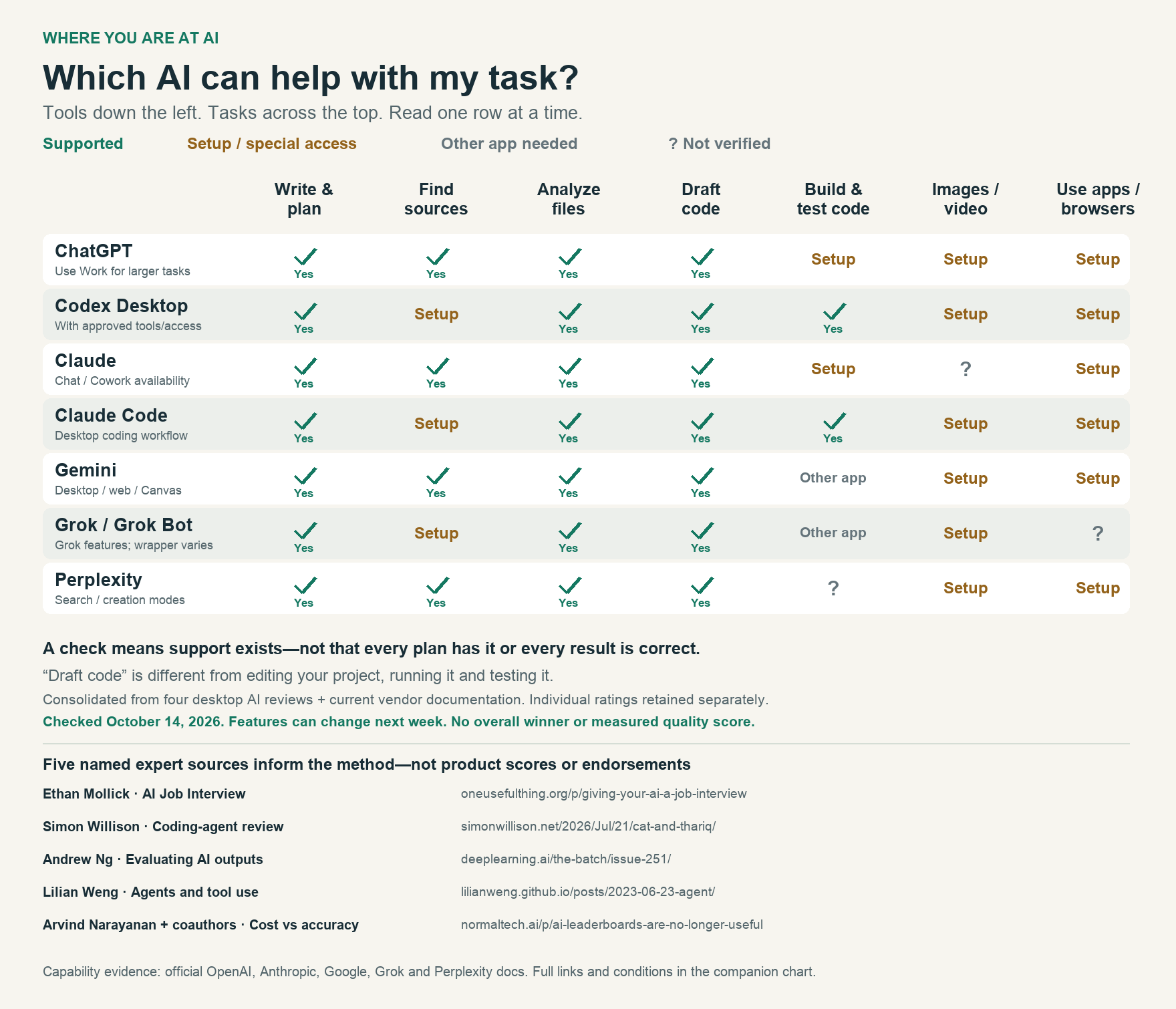
Read the capability chart as a table
✓ Documented support. △ A mode, plan, connected app or separate tool is needed. ? Not established in this review; not proof the product cannot do it. Scroll the table sideways on a small screen.
| Product / surface | Write & organize ideas | Research with sources | Analyze files / data | Draft code | Edit, run & test a local codebase | Create images / video | Act in browsers / apps |
|---|---|---|---|---|---|---|---|
| ChatGPT (Work for larger tasks) | ✓ | ✓ | ✓ | ✓ | △ Work/local tools or Codex | △ media tools; video access separate | △ desktop/browser features and permissions |
| Codex Desktop | ✓ | △ search tools | ✓ with supported file tools | ✓ | ✓ with project access | △ connected media tools; not the coding model itself | △ Computer Use / browser setup |
| Claude (chat / Cowork where available) | ✓ | ✓ | ✓ | ✓ | △ local folder access and task tools; verify workflow | ? native raster image/video generation not established here | △ Desktop/Cowork or Chrome permissions |
| Claude Code Desktop | ✓ | △ search/tools | ✓ with file/runtime access | ✓ | ✓ with project access | △ external media tools; not native coding-model output | △ supported browser/computer tooling |
| Gemini desktop/web | ✓ | ✓ Deep Research | ✓ uploaded files | ✓ Canvas | △ separate coding-agent product; Canvas apps are a different scope | △ image/video tools and plan | △ Gemini in Chrome auto browse / eligibility |
| Grok / Grok Bot | ✓ | △ search-enabled mode | ✓ uploads in Grok | ✓ | △ Grok Build is a separate coding agent | △ Grok Imagine and limits | ? Grok Bot wrapper's exact action permissions not verified |
| Perplexity | ✓ | ✓ | ✓ uploads/analysis | ✓ | ? local repo edit/test in ordinary Perplexity not established | △ supported plan's generation tools | △ separate Comet/Computer experience and permissions |
One job. Different tools can help.
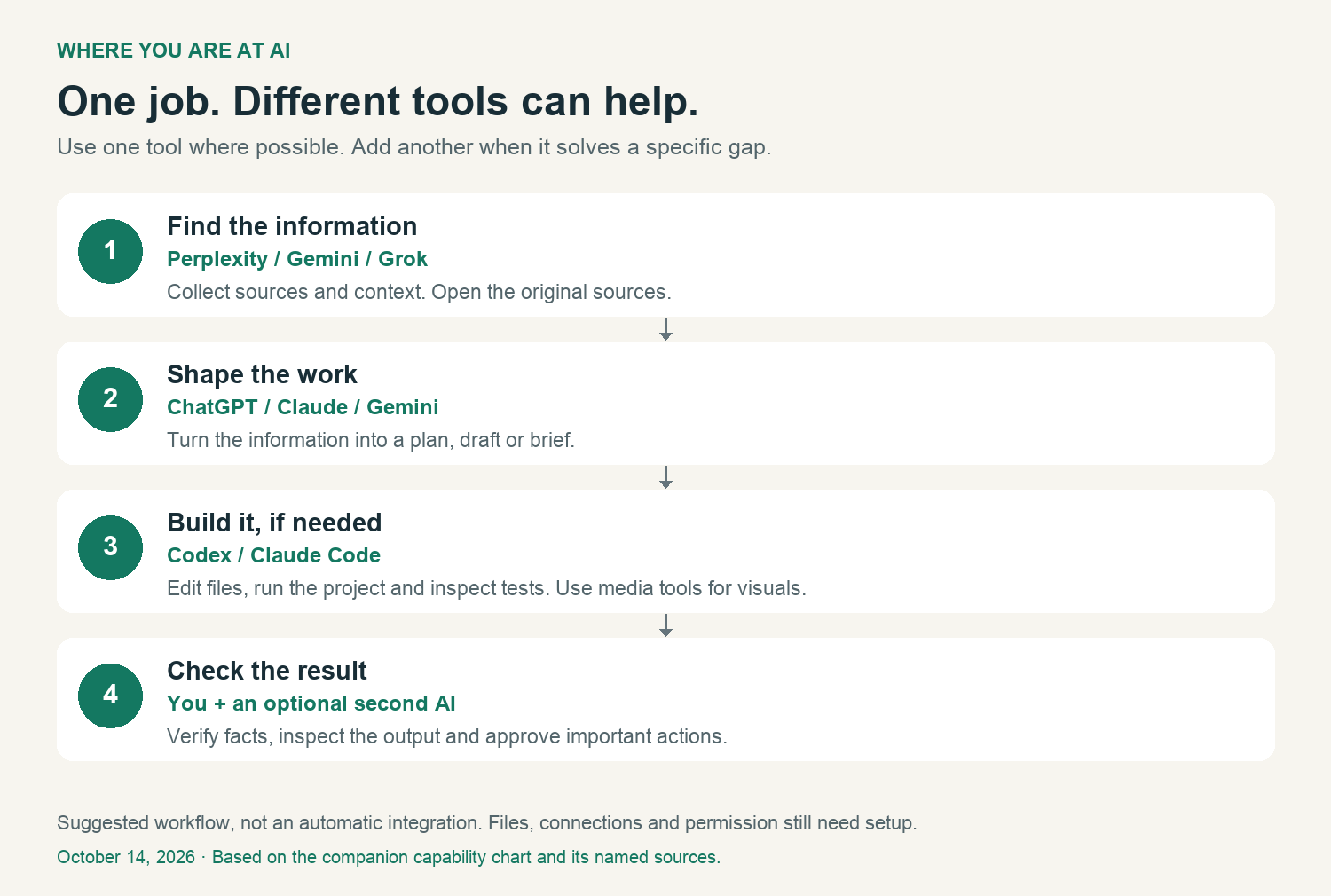
- Find information: Perplexity, Gemini or search-enabled Grok can help collect sources. Open the original sources.
- Shape the work: ChatGPT, Claude or Gemini can help organize a plan or draft.
- Build if needed: Codex or Claude Code can work on files and tests with project access. Media creation needs supported tools.
- Check: You inspect the result, with an optional second AI. Verify important facts and actual changes.
The named authors in the graphics inform the evaluation method. They did not collectively score these products or endorse this business. Individual AI reviewer ratings remain outside this resource. No measured winner, guessed pricing, or private reviewer capture is included.
Choose by the next step.
Start with one task and an output you can check. These practical lessons help you decide what kind of assistance you need.
- For research: ask one unresolved question at a time. Open the original sources and check what they actually support.
- For building: use a tool with access to the actual project. Define the files, boundaries, expected result, and checks before making changes.
- For review: provide the exact draft or screenshot and ask focused questions. Treat useful criticism as something to verify; agreement alone does not prove the result works.
- For handoffs: include the current version, completed work, missing input, and one clear next action.
- For finishing: inspect the actual file, page, or destination. An accepted prompt, written plan, or success message is not the same as a completed task.
No single product needs to do every step. Keep a small checked example and notes you can use to repeat the work yourself.
Product sources
- OpenAI: Chat, Work and Codex
- OpenAI: computer use
- Anthropic: Claude chat and Cowork
- Anthropic: Claude Code
- Google: Gemini
- Grok product overview · Grok Build
- Perplexity Pro · Comet
Local preview. Prepare notes; no appointment is booked.